A better way to write and develop your story

What are you looking for?

Scriptopus is a free screenplay editor and a complete story development workspace. Choose the path that fits you.

Just want to write?

A professional screenplay editor.Totally free.

The editor you would otherwise pay for. Industry formatting as you type, a Beat Board, Treatment and Story Canvas, and export to PDF, Final Draft and Fountain.

  • Mac and Windows
  • No card
  • Works offline

Want to go further?

Go beyond the editor.Develop, organize and improve your story.

Pro is the same editor with dramaturg chat that has read your whole script and answers in seconds, plus smart reports, cloud backup and teams. In your browser, on your desktop and on your phone.

  • No card
  • Every feature
  • Keep Free any time

The Editor

An Editor That Is

Formatting snaps to industry standard as you type. And, with all the keyboard hotkeys you like.

FreeThe whole editor, on your own computer and offline.ProDramaturg chat beside the editor. Reports for continuity, momentum and more.
Scriptopus for Mac and Windowsapp.scriptopus.com
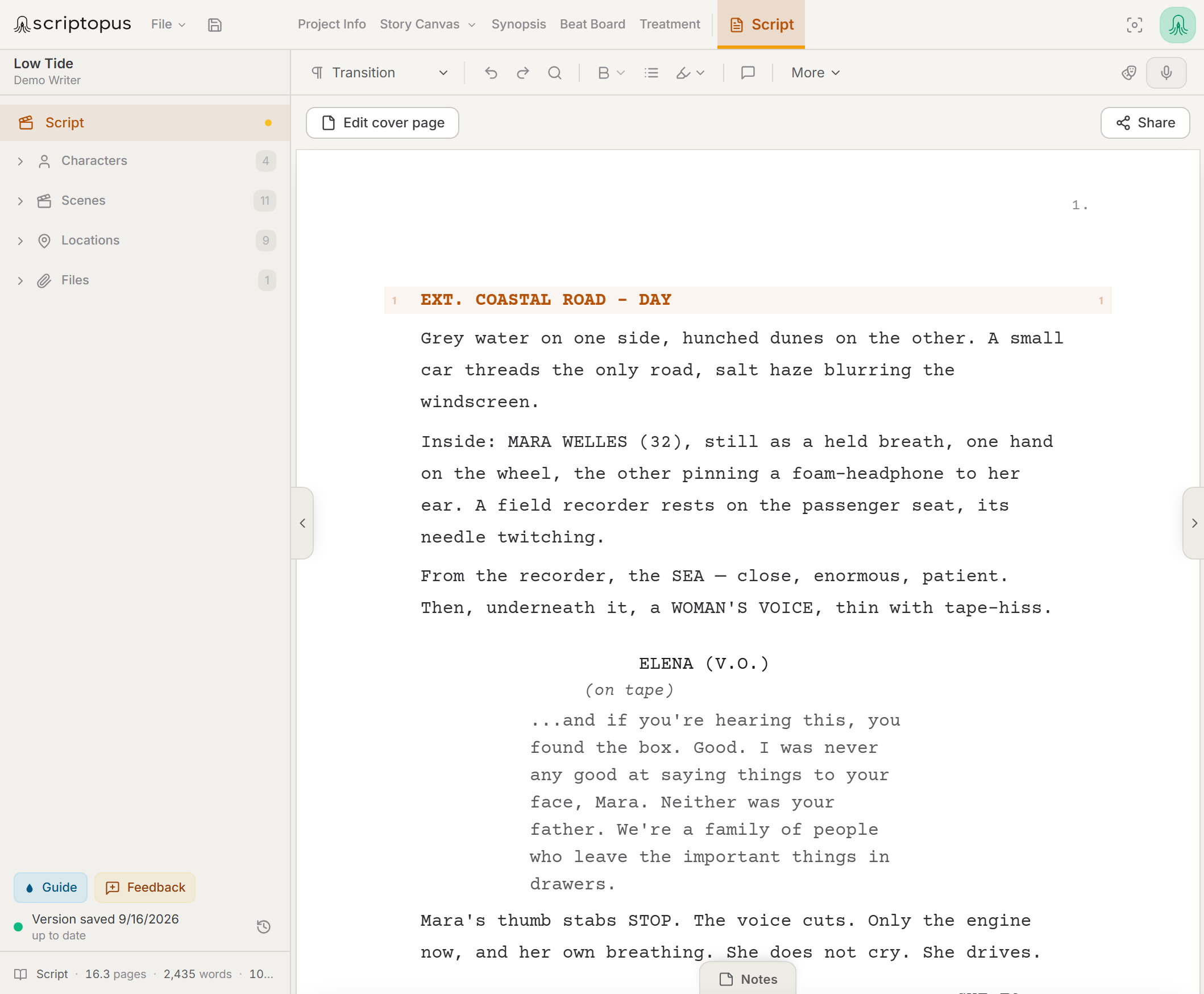
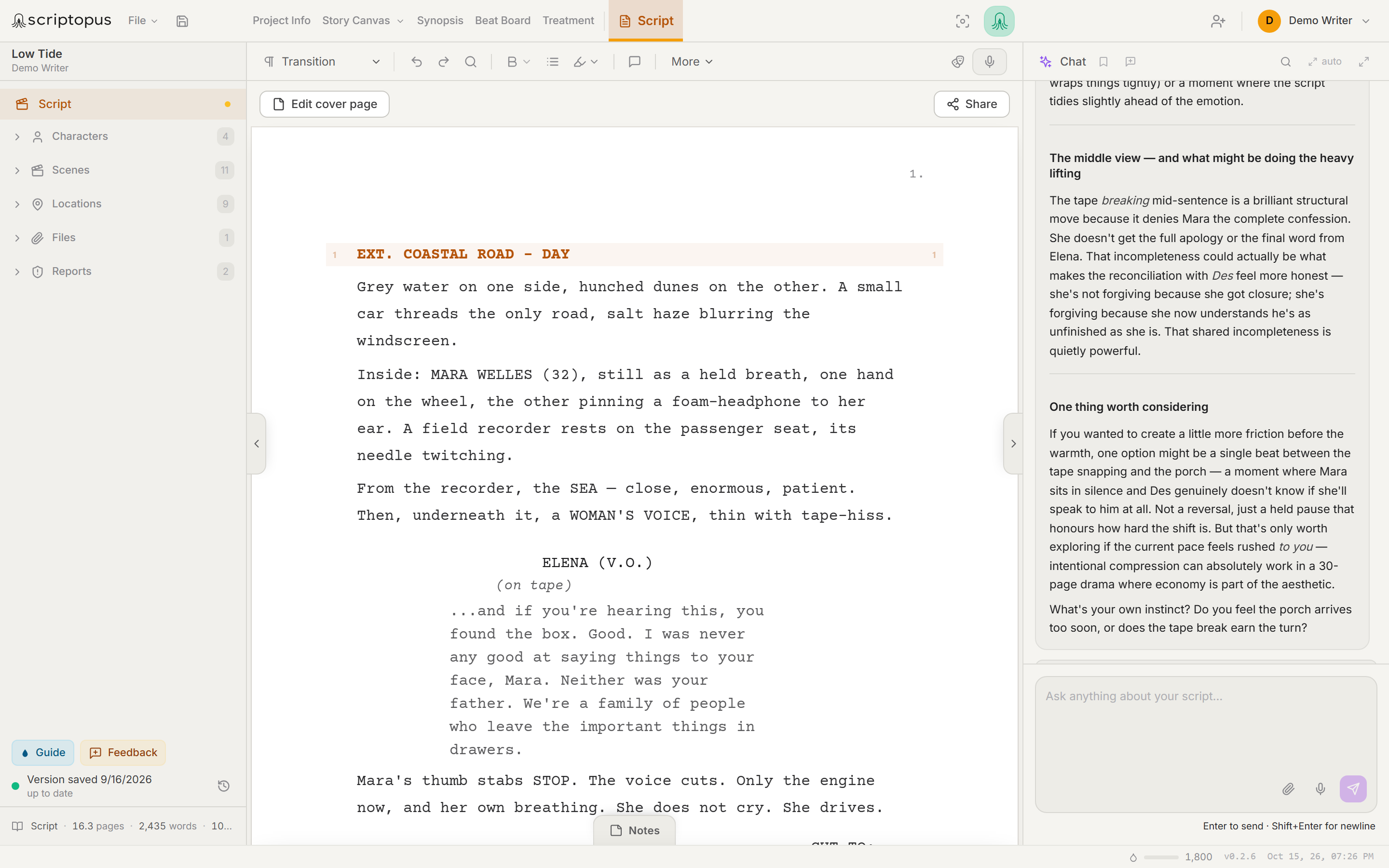
The free Scriptopus editor: an industry-formatted screenplay page with the character, scene and location lists in the side rail.The Scriptopus writing surface: an industry-formatted screenplay editor with the character, location and file lists and saved reports in the side rail, and dramaturg chat giving notes on the scene beside the page.
01Free

It knows your characters

The cast list builds itself from your pages. Every character is one click away.

02Free

It knows your places

Every location the script visits, collected from your sluglines automatically.

03Pro

It remembers what happened

Continuity checks read every scene, returning timeline, character and plot-logic notes with line numbers.

04Pro

It has read the whole thing

The chat beside the page knows your script, synopsis, beats and treatment. Ask anything.
02 Free

Totally Free.
The Whole Writing Workspace.

Everything here is in the free desktop app for Mac and Windows. It runs on your own computer, works offline, and your scripts stay there. Bring them in from Final Draft, Fountain or Celtx.

Screenplay editor
Characters
Locations
Scene list
Beat Board
Treatment
Synopsis
Story Canvas
Focus Mode
Cover page
Local backups
Export to PDF, FDX and Fountain

03 Free

Visualize. Organize. Connect.

Powerful visual tools that hold the big picture and the small details at once.

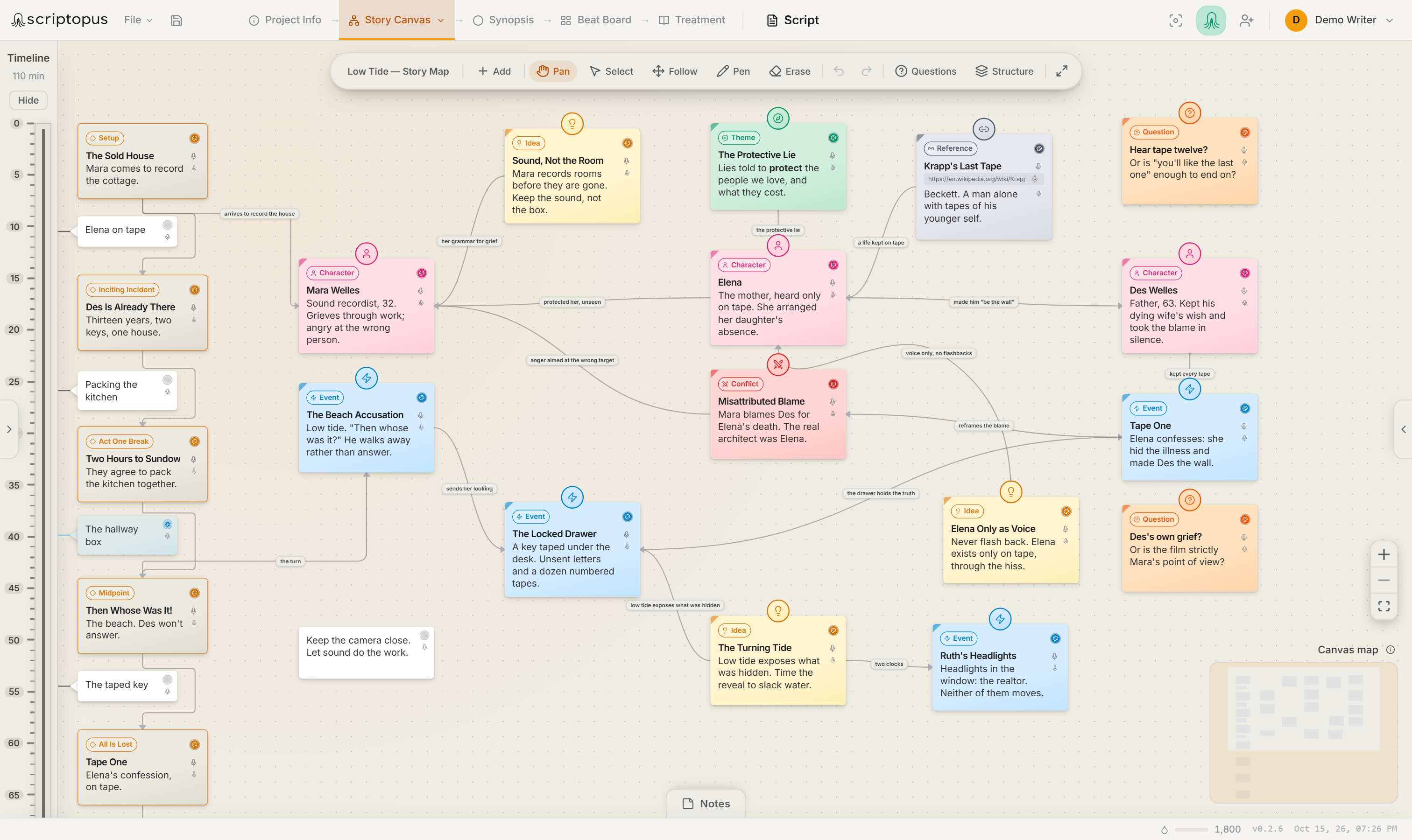
The Story Canvas: a three-act structure pinned to a minutes timeline down the left, beside a map of the screenplay's characters, theme, central conflict, key events, ideas and open questions, joined by labelled relationships.

Characters, conflicts, ideas and events, mapped as connected nodes against your structure framework.

See connections at a glance

Every node knows how it relates to the rest of the story.

Reorder, regroup, restructure

Drag beats and scenes until the shape feels right.

One project, not five files

Characters, locations and notes are shared by every stage. When beats and synopsis drift apart, Auto-Harmonize drafts the update for you to approve. Pro

04 Free

A Workflow Built for Story Development

Every step connects to the next. Move freely between ideas, structure and script. Nothing has to be re-entered along the way.

Idea

Capture ideas, loglines and concepts

Synopsis

Shape your story foundation

Beat Board

Map your story visually

Treatment

Develop your story in depth

Script

Write your screenplay

05

Built Around How Writers Actually Work

Real creative process is rarely a straight line. Scriptopus is built for the way it really goes.

Messy

Stories rarely start with page one. Capture ideas anywhere, and nothing gets lost.

Nonlinear

Jump between ideas, beats, scenes and structure. Work in whatever order serves the story.

Iterative

Develop, rethink, refine, evolve. Great stories aren't written. They're rewritten.

06

Designed for Every Kind of Story

Feature Films
TV Series
Limited Series
Short Films
Animation
And More

Pro When you need more

The Same Editor.
More Beside It.

Pro adds dramaturg chat that has read your whole script, smart reports, cloud backup and version history, share links, co-writing, dictation, Table Read and the pitch package. Everything from here down is part of Pro. Your first 2 months are free, with no card.

See Pro

07 Pro

Dramaturg Chat That Has Read Every Page

Scriptopus analyzes your story, questions it, and pushes back. That is what makes the difference to a scene, not another draft written for you.

The Authorship Boundary

Scriptopus helps you develop, analyze and manage your story. It never writes your screenplay for you.

  • It reads your script, questions it, and shows you what a first-time audience will follow.
  • It handles the work around the writing: research, analysis, reports, pitch materials.
  • No rewrite, shorten or polish button anywhere on your pages. No autocomplete.
  • Nothing is ever typed into your screenplay. Not one line.

Understand structure

See how your story holds up across every act.

Read it like a reader

See what a first-time audience will and won't follow.

Spot blind spots

Uncover plot holes and continuity gaps you missed.

Challenge assumptions

Question and strengthen your choices.

Strengthen progression

Make every beat earn its place.

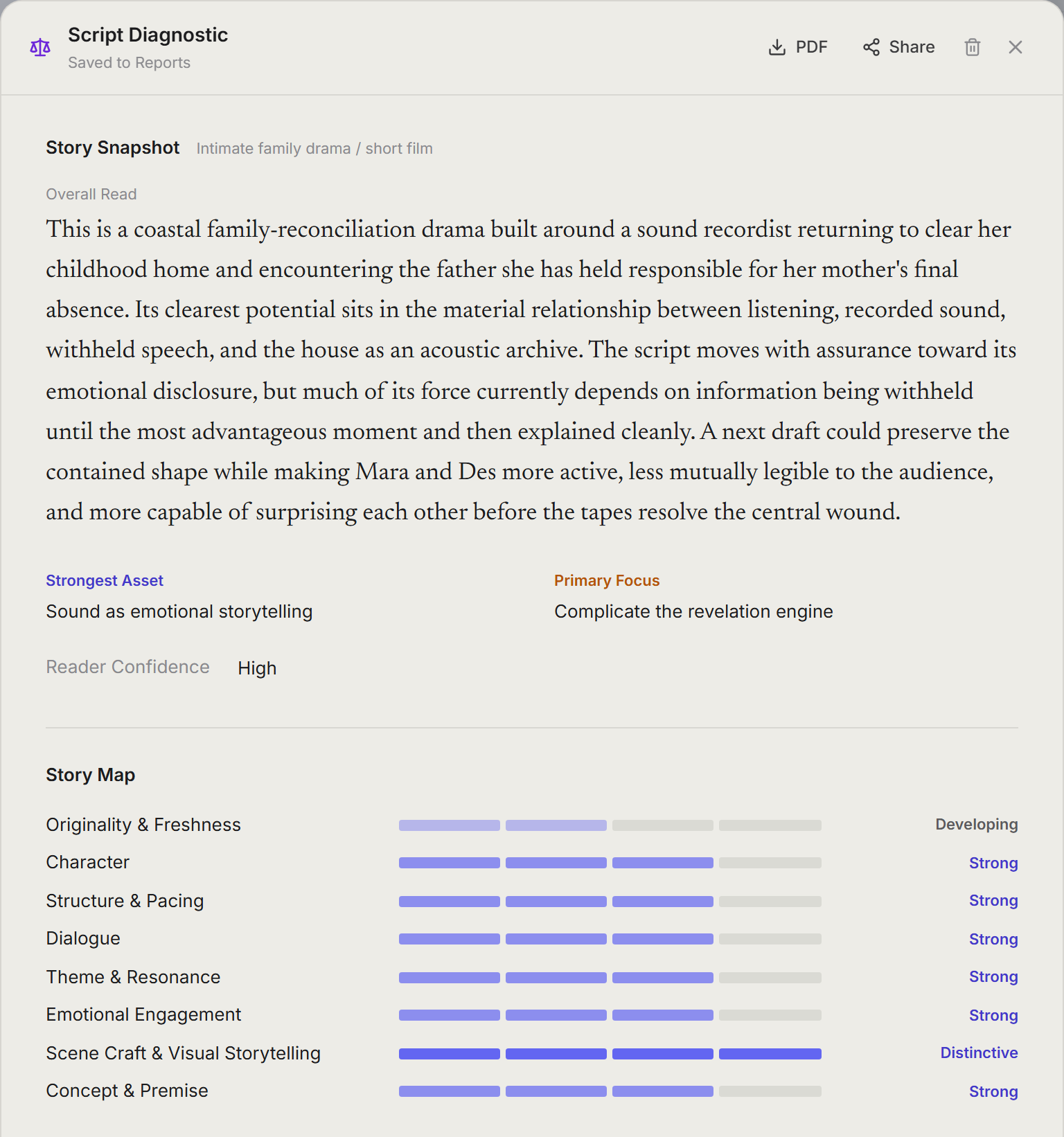
A Script Diagnostic report for a sample screenplay: a blinded read of the whole script that maps eight craft areas as Distinctive, Strong, Developing or Focus Area, names the habits the script repeats, and ends with a short list of development priorities.

— Inside the app Pro

A Real Look at Scriptopus

Not a mockup. These are the tools you'll actually use, running today. Click any shot for the full view.

08 Pro

Every Device.
Every Version.

Your projects live in the cloud as well as on your computer. Open them in the browser, in the desktop app or on your phone, and carry on where you stopped. Every change is backed up as you write.

Cloud backup

Every project is backed up as you write, so a lost laptop never means a lost script.

Write on the web

The whole workspace at app.scriptopus.com. Nothing to install, on any computer.

Sync

Desktop, browser and phone stay on the same page, on one account.

Version history

Go back to any saved version of a project and bring back what you need.

09 Pro

Share It. Write It Together.
Say It, Hear It.

Send your pages to readers, bring in your co-writers, speak a scene instead of typing it, and hear the whole script read aloud.

Share links

Readers open your pages with no account. Their comments and suggested edits come back for you to accept or reject.

Co-writing

Invite your co-writers. Each works in a private draft, then sends changes to the master copy for approval.

Dictation

Say a scene out loud. It lands on the page as headings, action and dialogue.

Table Read

Hear your script performed, with every character in its own voice, in your script’s language.

10 — Capture As You Go Pro

Ideas Don't Wait
for Your Desk.

Capture ideas the moment they happen, add notes directly into any active project, and keep everything synced with your main Scriptopus workspace.

Capture on your phone. Build in your workspace. Everything stays connected.

We know how writers think.

Add new ideas instantly
Open any project and dictate notes into synopsis, beat board or script
Share with view, comment or suggest-edits access
Open Scriptopus on Your Phone
scriptopus
A
The Last LightSci-Fi Thriller
Synopsis
Beat Board
Script
Notes
Characters
World
Plot Moments
Treatment
Add Document
Beat Board35
Share
ACT TWO
12
Updated
Midpoint Shift

A revelation forces the protagonist to make an impossible choice.

13
All Is Lost

Everything falls apart. The cost becomes real.

14
Dark Night of the Soul

The protagonist is at rock bottom and must choose a new path.

Projects
The Last LightUpdated just now
Echoes of TomorrowUpdated 2d ago
Northern SkiesUpdated 5d ago
Paper PlanesUpdated 1w ago
Midnight RunUpdated 2w ago
The Last LightSci-Fi Thriller
OverviewBeat BoardScriptNotes
ACT TWO
Midpoint Shift

A revelation forces the protagonist to make an impossible choice.

Add voice note

A letter from his father reveals the truth. He realizes the mission is bigger than he thought.

Cancel Done
Note added to Beat Board✓ Synced just now
SyncedAll changes up to date
Shared with
Add People or Group

11 — Pitch & Deliverables Pro

Make the Story
Ready to Share

You've done the hard part: the story is there.

Scriptopus helps turn your synopsis, treatment, characters, locations, notes and visuals into polished pitch-ready materials, without copying your story from one tool to another just to make it presentable.

Build a pitch package, generate visual references, preview every page, edit what you need and export only when it feels right.

Scriptopus turns your story materials into professional, ready-to-share pitch assets.

Characters
Maya

Brilliant, determined and haunted by the past.

Supporting
scriptopus
ECHOES A Feature Film Written byYour Name
World
Iceland

A raw, untamed world of vast landscapes and hidden history.

Synopsis
Logline

When a scientist returns to her remote hometown, she uncovers a buried truth that threatens everything she believes.

Synopsis
Inventory
Generate
Preview
Export
Edit Section Replace Visual Preview Export PDF

Pitch Package Wizard

Turn existing story materials into a structured pitch package.

Visual References

Generate or add character, location, mood and world references.

Ready-Made Formats

Use professional layouts for film, series, shorts or project files.

Preview Before Export

Review every page before anything becomes final.

Edit Everything

Change text, reorder sections, replace visuals and refine the package.

Share or Export

Send a polished PDF or share the project with view, comment or suggest-edits permissions.

Where Scriptopus Runs

In Your Browser,
on Your Mac and Windows PC.

The full workspace runs on the web. The desktop app is the same workspace on the same account, for Mac and, through the Microsoft Store, for Windows.

Available now

Web

The complete workspace at app.scriptopus.com: every surface and every report, in any modern browser.

Start in your browser →
Available now

macOS

The same workspace as a native Mac app, on the same account. On the Free plan, this is where you write.

Download for Mac ↓
Available now

Windows

The same workspace as a Windows app, from the Microsoft Store, which keeps it up to date. Sign in with the same account.

Get it from the Microsoft Store →
Every plan
Keep it local

Your scripts live on your own device. Write offline; nothing has to leave your desk. Free always works this way, and Pro and Pro X can choose it too.

You decide
Pro and Pro X
Or cloud-backed

Sync across devices with automatic backups and version history riding along.

Either way, one-click exports (PDF, FDX, Fountain, full project archive) mean your work is always yours to take.

Compare the plans

Plans

Three Plans.
One Workspace.

Both paid plans include every feature, teams included, and both work in the browser and in the desktop app on one account. The only difference is how much you use dramaturg chat, reports and images, which we count in Ink. Free is the desktop app on a free account.

While we are in beta

Pro costs nothing today, and Pro X opens later. These are the prices for when the beta ends, and every member will hear from us well before that happens. Nothing will start charging you by surprise. Once plans begin, every new member gets their first two months of Pro free, with no card needed.

Free

$0for good

The desktop app, on a free account.

The whole writing workspace, running entirely on your computer.

No dramaturg chat or reportsYour scripts never leave your computer, so nothing reads them but you.
  • Screenplay editor, Beat Board, Treatment and Story Canvas
  • Export to PDF, Final Draft and Fountain
  • Local backups of every project
  • No sync, sharing or teams
  • You can still have Pro free for 2 months, no card needed. Pro works online.
Coming soon

Pro X

$20a month, billed yearly

or $28 month to month

For series, long projects and dramaturg chat every day.

5,400 Ink a monthRoughly 450 chat messages, 15 reports and 30 images.
  • Everything in Pro
  • Three times the Ink
  • Room for big projects, where every question in dramaturg chat reads more pages
  • The same features as Pro: nothing is held back on either plan

Not open yet. Start on Pro today and move up when Pro X opens.

Desktop app · every plan

When it first opens, sign in or create your account. You choose your plan there.

In your browser · Pro and Pro X

Free runs in the desktop app only, so your scripts stay on your computer.

What is Ink?

Ink is how we count what dramaturg chat, reports and images use. They run on language models, so a quick question takes a little and a full-script report takes more. Dictation and formatting use none.

A busy month?

Add extra Ink from $5 whenever you need it. It never expires, and it is only touched once your monthly Ink is gone.

When Ink runs out

Dramaturg chat and reports pause until the month renews or you add more. Writing never stops, and nothing in your project is locked.

Join the future of storytelling.

Your first 2 months of Pro are free. No credit card, nothing to install. From the first spark of an idea to the finished pitch.